SAP Fiori vs Neptune Software Which Platform Is Right for Your Business

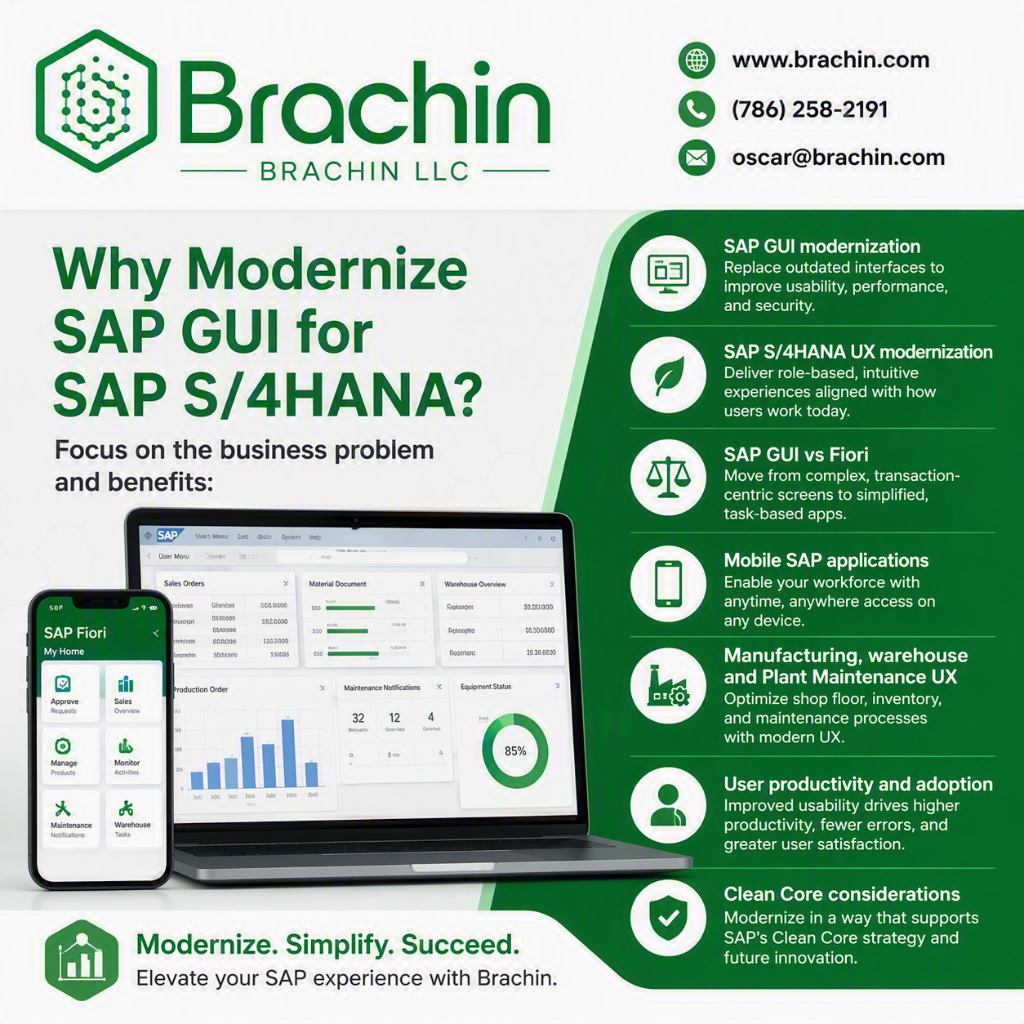
Why Modernize SAP GUI for SAP S/4HANA?
SAP Fiori vs Neptune Software: Which Is Right for Your Business?
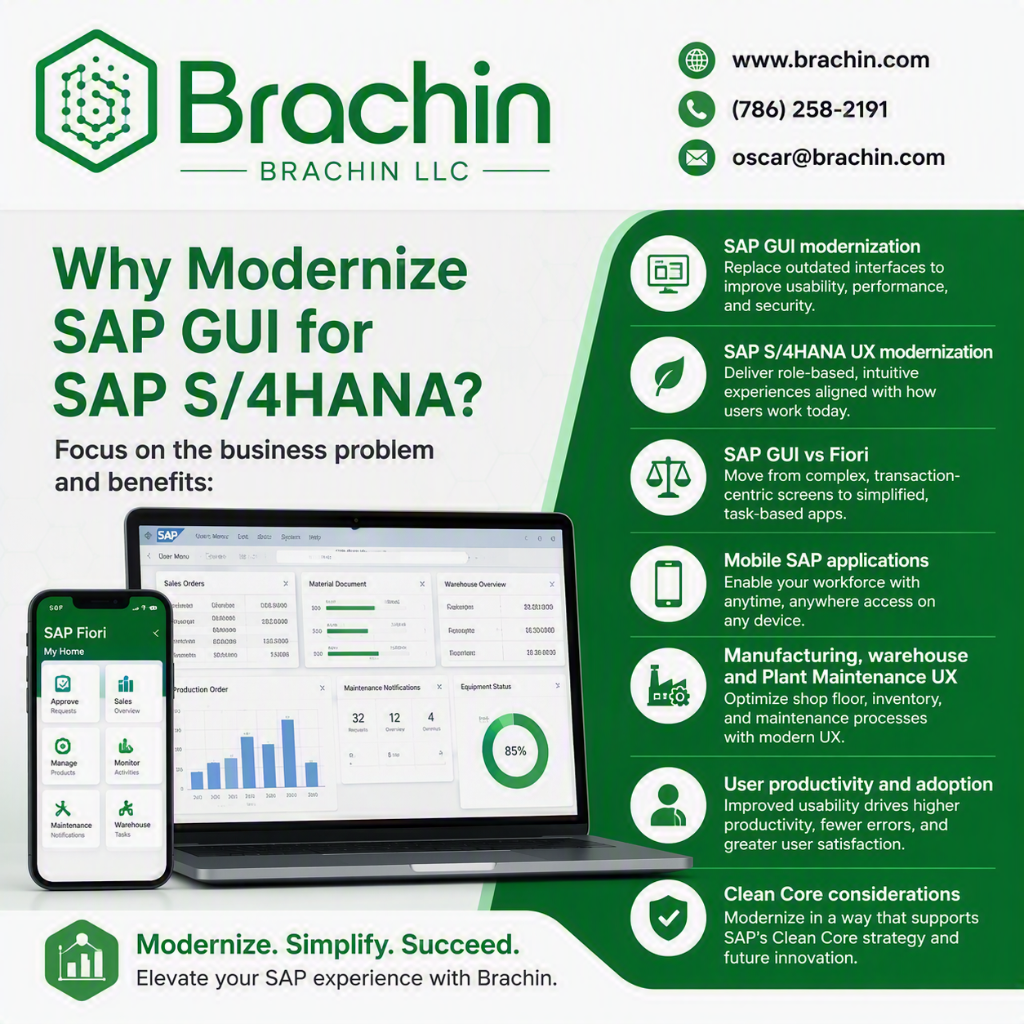
Modernize SAP With a Business-Focused Application Strategy
SAP GUI to Fiori Migration Using Neptune Software
SAP S/4HANA UX Modernization, Mobile SAP Applications & Clean Core Architecture
Organizations moving to SAP S/4HANA do not necessarily need to rebuild every SAP GUI transaction. The better approach is to evaluate each business process and determine whether SAP Fiori, SAPUI5, Neptune Software, SAP BTP, custom development, or existing SAP GUI provides the best business and technical outcome.
BRACHIN LLC helps organizations modernize SAP user experiences while reducing unnecessary custom development and protecting the SAP S/4HANA Clean Core.
Whether you are modernizing SAP GUI transactions, warehouse applications, manufacturing applications, Plant Maintenance workflows, mobile SAP applications, or custom Z-transactions, BRACHIN can help define the right modernization strategy.
Primary topics: SAP GUI migration, SAP Fiori migration, Neptune Software, SAP S/4HANA UX modernization, SAP mobile applications, SAPUI5, SAP BTP, Clean Core, warehouse mobility, manufacturing applications, Plant Maintenance applications.
Need Help Modernizing SAP GUI?
BRACHIN can assess your SAP GUI and custom application portfolio and identify which processes should remain on SAP GUI, move to standard SAP Fiori, or be redesigned using Neptune Software, SAPUI5, SAP BTP, or custom development.
Why Modernize SAP GUI?
SAP GUI remains an important interface in many SAP S/4HANA environments. However, traditional transaction-based applications can create usability challenges for employees who perform highly focused operational tasks.
This is particularly common in:
Manufacturing
Warehouse operations
Inventory management
Plant Maintenance
Quality Management
Field service
Production operations
Procurement
Shipping and receiving
Mobile and remote work
A warehouse operator may need to complete a simple scanning transaction, while a production operator may only need to confirm an operation, report scrap, or consume a component.
The underlying SAP transaction may be powerful—but it may not provide the simplest user experience.
SAP UX modernization can help organizations:
Simplify the user experience
Reduce unnecessary screens, fields, navigation and transaction-code complexity.
Improve SAP mobile usability
Support smartphones, tablets, rugged devices and barcode scanners where appropriate.
Increase user adoption
Provide role-based applications designed around what users actually need to accomplish.
Reduce manual data entry
Use scanning, simplified forms and workflow-driven applications.
Improve shop-floor productivity
Create focused applications for production, quality, maintenance and warehouse personnel.
Modernize custom Z-transactions
Evaluate whether expensive custom SAP GUI applications should be redesigned using modern UX technologies.
SAP GUI vs SAP Fiori vs Neptune Software
There is no universal requirement to replace SAP GUI with a single technology.
The right SAP modernization strategy depends on the business process, user persona, technical architecture, integration requirements and business case.
Capability
SAP GUI
SAP Fiori
Neptune Software
Modern UX
Traditional
Excellent
Highly configurable
Responsive UI
Limited
Yes
Yes
Mobile applications
Limited
Yes
Strong use case
Offline scenarios
Limited
Application dependent
Strong use case
Custom applications
ABAP-centric
UI5 / Fiori Elements
Low-code + pro-code
SAP integration
Native
Native
SAP-centric
Best fit
Classic processing
Standard SAP UX
Tailored applications
The key architectural question
The question should not simply be:
"How do we replace SAP GUI?"
A better question is:
"Which user experiences should use standard SAP Fiori, and where does a technology such as Neptune Software provide measurable business value?"
This business-process approach can prevent organizations from simply rebuilding old transaction complexity inside a new interface.
SAP Fiori vs Neptune Software: Which Is Right?
SAP Fiori and Neptune Software should not automatically be treated as competing technologies.
In many SAP S/4HANA environments, they can serve different purposes.
Use SAP Fiori When:
SAP already provides the required application.
Standard Fiori Elements meets the requirement.
An SAP-delivered Fiori application provides the necessary functionality.
The organization wants to remain closely aligned with SAP-standard UX.
Standard SAP lifecycle management is preferred.
The business process does not require extensive customization.
Consider Neptune Software When:
Multiple SAP transactions need to become one focused workflow.
A highly tailored mobile application is required.
Rugged-device or scanner-based workflows are important.
Offline operation is a significant business requirement.
Shop-floor users need simplified screens.
Warehouse employees require task-specific applications.
Existing SAP business logic should be retained while the user experience is redesigned.
A custom application requires both low-code and pro-code capabilities.
BRACHIN Recommendation
Evaluate standard SAP Fiori first.
If standard Fiori does not adequately address the business requirement, evaluate SAPUI5, Neptune Software, SAP BTP and custom ABAP based on architecture, complexity, business value, Clean Core impact and total cost of ownership.
Neptune Software Architecture for SAP S/4HANA
A successful SAP UX modernization architecture should separate the user experience from SAP business logic and minimize unnecessary modifications to the S/4HANA core.
1. User Experience Layer
Applications can support:
Desktop
Tablet
Smartphone
Rugged devices
Barcode scanners
QR scanners
2. Application Layer
The application layer can provide:
Responsive applications
Mobile workflows
Role-based UX
Focused business applications
Offline experiences where justified
3. Integration Layer
The integration architecture should consider:
APIs
OData
SAP services
Authentication
Authorization
Integration monitoring
Data synchronization
4. SAP S/4HANA Business Logic
Whenever practical, the architecture should reuse existing SAP business logic and appropriate standard APIs.
Clean Core Principle
A modernization program should not turn a low-code project into another collection of tightly coupled SAP customizations.
The objective should be to improve the user experience while maintaining a sustainable S/4HANA architecture.
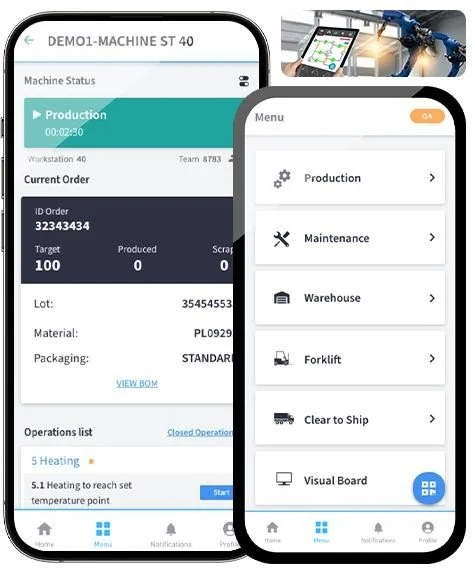
SAP Mobile Applications for Manufacturing
Manufacturing is a strong candidate for focused SAP mobile applications.
Operators frequently need to perform a small number of activities repeatedly:
Confirm production operations
Report production quantities
Report scrap
Report rework
Consume components
Scan serial numbers
Review production orders
Record quality information
Check work-center status
A transaction-oriented SAP GUI experience can require navigation through functionality that the operator does not need.
A purpose-built application can instead organize the workflow around the physical manufacturing process.
Example SAP manufacturing mobile applications
Production order confirmation
Operation confirmation
Component consumption
Goods issue
Goods receipt
Scrap reporting
Rework processing
Serial number scanning
Quality results
Production status
Work-center status
Mobile SAP Warehouse Applications
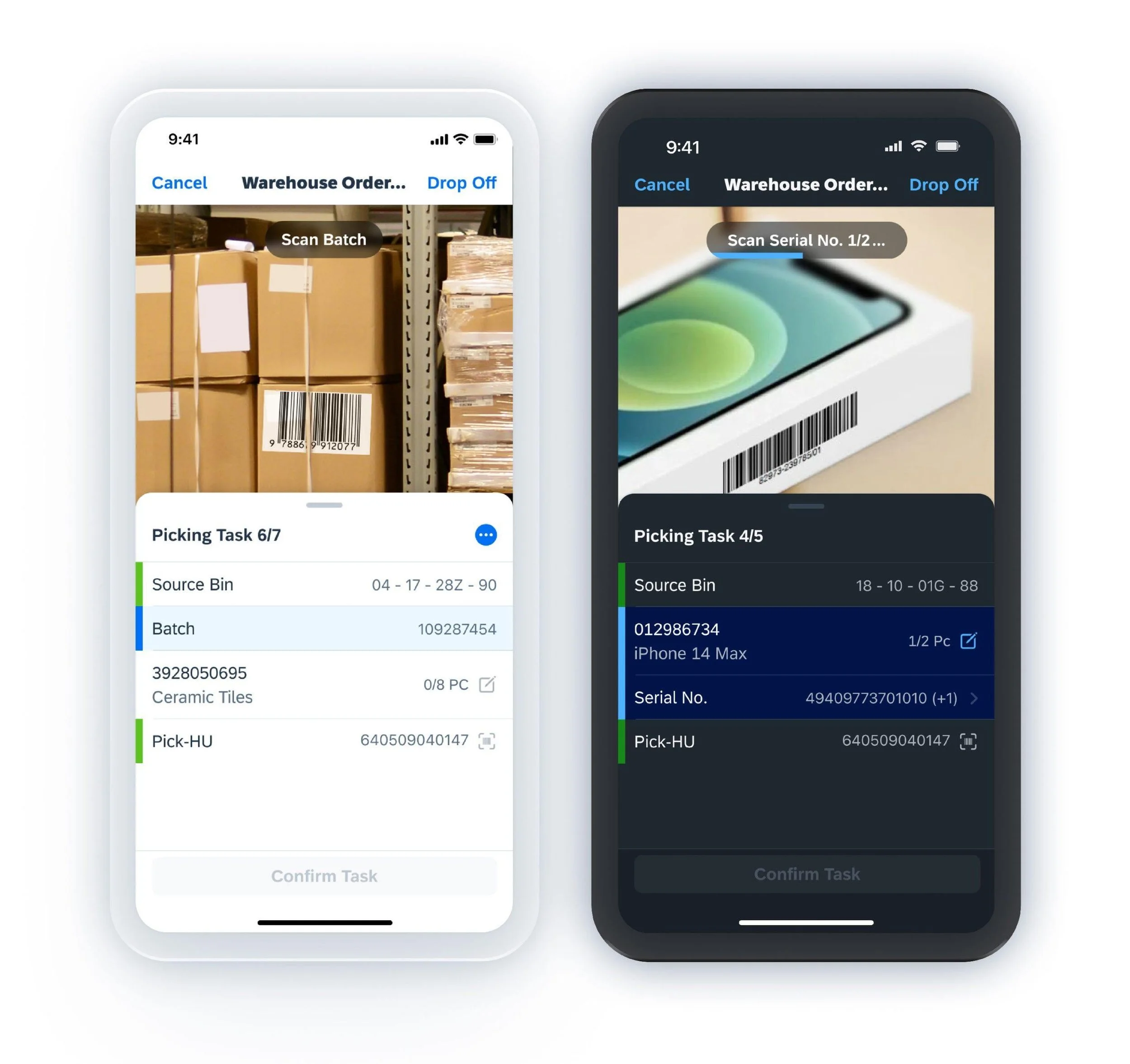
Warehouse employees work in a physical environment where scanning, mobility and task-oriented workflows can be more important than traditional transaction navigation.
Potential SAP warehouse applications include:
Barcode scanning
QR-code scanning
Goods receipt
Goods issue
Bin-to-bin movement
Picking
Putaway
Handling Unit processing
Inventory lookup
Cycle counting
Stock transfers
Material identification
The application should be designed around the warehouse worker's physical workflow rather than simply reproducing the underlying SAP transaction.
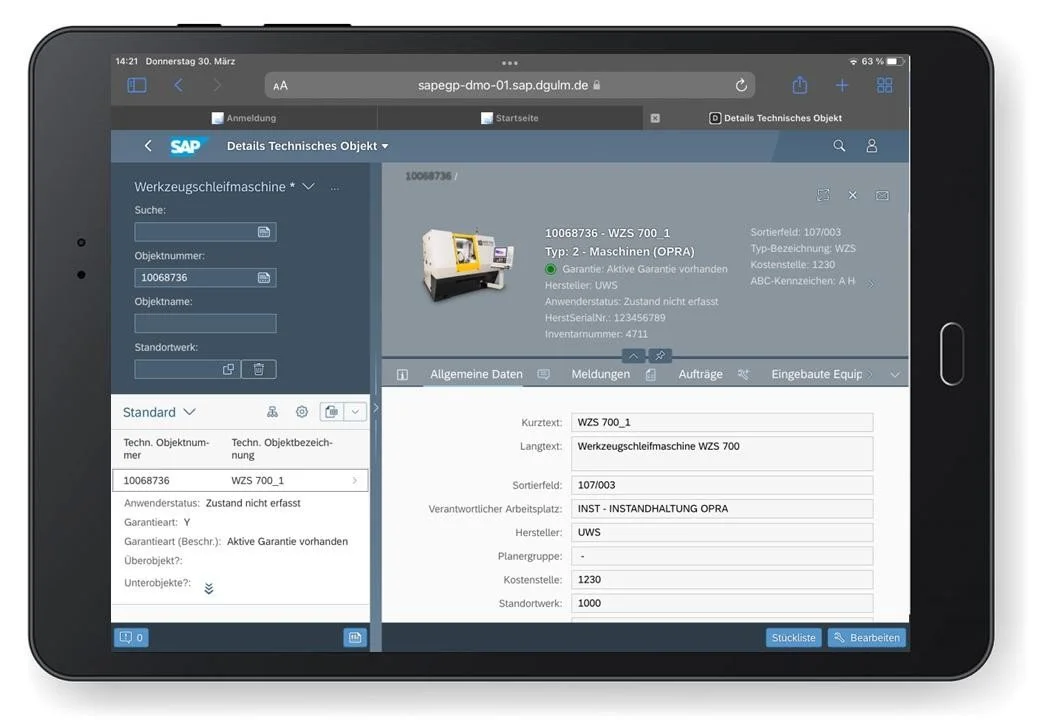
SAP Plant Maintenance Mobile Applications
Plant Maintenance technicians often work away from a desktop computer.
Mobile SAP applications can support:
Maintenance notifications
Maintenance orders
Equipment
Functional locations
Work confirmations
Time confirmations
Parts consumption
Photos and attachments
Barcode scanning
QR-code scanning
Technician workflows
Offline scenarios where justified
A mobile-first experience can help technicians interact with SAP from the location where maintenance work is actually performed.
Neptune Software vs SAP Build Apps
Can Neptune Software replace SAP Fiori?
Organizations evaluating SAP low-code application development may also consider SAP Build Apps.
The correct technology depends on the organization's SAP architecture, development strategy, mobile requirements, integration model, governance and total cost of ownership.
Decision Factor
Questions to Ask
SAP Integration
How directly does the platform integrate with the S/4HANA architecture?
Mobile
Are responsive, scanner-oriented or offline applications required?
Development
Does the team need low-code, pro-code or both?
Governance
How will applications be secured, tested, transported and supported?
Architecture
How does the solution support the organization's Clean Core strategy?
Economics
What is the five-year total cost of ownership?
Skills
What development and support skills already exist?
Lifecycle
How will applications be maintained after go-live?
BRACHIN recommends an architecture-led evaluation rather than selecting a platform solely because it is categorized as "low-code."
Neptune Software Implementation Best Practices
A successful Neptune implementation starts with the business process—not the SAP transaction.
1. Start with the business process
Document what the user needs to accomplish rather than simply reproducing an existing transaction.
2. Identify standard Fiori alternatives
Determine whether SAP already provides the required functionality.
3. Map users and personas
Understand the needs of:
Operators
Warehouse employees
Maintenance technicians
Quality personnel
Supervisors
Managers
Field workers
4. Reuse SAP business logic
Use appropriate APIs and standard services wherever practical.
5. Protect the Clean Core
Avoid unnecessary backend modifications and tightly coupled customizations.
6. Design mobile-first where appropriate
Do not assume that a desktop application should simply be resized for a mobile device.
7. Design security from the beginning
Address authentication, authorization, least privilege, data protection and auditing.
8. Test on real devices
A mobile application should be tested using the actual devices, scanners and network conditions users will encounter.
9. Design offline synchronization deliberately
Offline functionality introduces important considerations around synchronization, conflicts, data consistency and security.
10. Establish application lifecycle governance
Define ownership, support, enhancement, testing, transport and release processes before production deployment.
Common SAP UX Modernization Mistakes
Organizations can create unnecessary complexity when modernizing SAP GUI.
Common mistakes include:
Rebuilding every SAP GUI transaction.
Ignoring standard SAP Fiori applications.
Designing around transactions instead of business processes.
Creating excessive backend customization.
Underestimating SAP authorization requirements.
Ignoring offline synchronization.
Failing to test mobile performance.
Assuming low-code eliminates architecture requirements.
Neglecting application lifecycle governance.
Failing to define post-go-live ownership.
Selecting technology before defining the business problem.
The better approach
Assess → Prioritize → Architect → Prototype → Build → Test → Deploy → Optimize
Neptune Software Security and Performance
Security should be designed into the application architecture.
Key areas include:
SSO
SAP authorization
Role-based access
Least privilege
API security
TLS
Session management
Device security
Offline data protection
Auditability
Application monitoring
Integration monitoring
SAP Mobile Application Performance
Performance should be evaluated across the complete technical path:
Device → Network → Application → Integration → SAP S/4HANA
Potential performance factors include:
API design
Payload size
Number of API calls
Backend processing
Network latency
Caching
Device capabilities
Synchronization architecture
A fast application on a development network may perform very differently on a production warehouse or manufacturing floor.
Neptune Software Licensing and Total Cost of Ownership
Licensing should be evaluated as part of the overall business case.
Commercial terms may vary depending on products, users, applications, environments, deployment architecture and contractual arrangements.
BRACHIN recommends validating current commercial terms directly with the software provider rather than relying on outdated public pricing.
Evaluate:
User licensing
Application licensing
Development environments
Production environments
Mobile users
Infrastructure
Hosting
Implementation
Support
Maintenance
Enhancements
Upgrade costs
The correct comparison is not simply license price.
It is:
License + Implementation + Integration + Support + Maintenance + Enhancements + Infrastructure + Lifecycle Cost
SAP GUI to Fiori Migration Assessment Checklist
Before starting development, BRACHIN recommends evaluating:
Business case
SAP GUI application inventory
Custom Z-transaction inventory
Standard Fiori assessment
User personas
UX assessment
Mobile requirements
Offline requirements
Target architecture
API strategy
Integration design
Security
Authorization
Clean Core impact
UX prototype
Development standards
Unit testing
Integration testing
Performance testing
Mobile testing
Offline testing
UAT
Cutover
Training
Production support
Modernize SAP With a Business-Focused Application Strategy
BRACHIN takes an architecture-first, business-process-driven approach to SAP UX modernization
BRACHIN SAP UX Modernization Consulting Services
Modernize SAP With a Business-Focused Application Strategy
BRACHIN helps organizations evaluate SAP GUI, SAP Fiori, SAPUI5, Neptune Software, SAP BTP and custom development to determine the appropriate modernization strategy for each business process.
Discover
Inventory SAP GUI transactions, custom applications, business processes and user personas.
Assess
Compare:
Standard SAP Fiori
Fiori Elements
SAPUI5
Neptune Software
SAP BTP
Custom ABAP
Existing SAP GUI
Design
Define:
UX architecture
Integration architecture
Security
Mobile strategy
Offline architecture
Clean Core approach
API strategy
Build
Develop focused applications for:
Manufacturing
Warehouse
Inventory
Quality
Plant Maintenance
Mobile operations
Other business processes
Deploy
Support:
Testing
UAT
Cutover
Training
Production readiness
Deployment
Optimize
Improve:
Application performance
User experience
Mobile usability
Business workflows
Application lifecycle management
SAP UX Modernization: Why BRACHIN?
BRACHIN takes an architecture-first, business-process-driven approach to SAP UX modernization.
The objective is not to replace SAP GUI simply because it is old.
The objective is to determine:
What is the simplest, most sustainable and economically justified user experience for each business process?
That may mean:
Keep SAP GUI → where it remains appropriate.
Use SAP Fiori → where SAP standard functionality meets the requirement.
Use SAPUI5 → where a custom UI is required.
Use Neptune Software → where highly tailored, mobile, responsive or offline applications provide measurable value.
Use SAP BTP → where extension and integration architecture calls for it.
Use custom development → only when justified by the business and technical requirements.
Frequently Asked Questions
Can Neptune Software replace SAP Fiori?
Neptune should generally be viewed as an additional application-development option rather than a blanket replacement for SAP Fiori.
Standard SAP Fiori should be evaluated first when SAP already provides the required capability.
Can Neptune Software work with SAP S/4HANA?
Neptune can be evaluated for SAP-centric application development and S/4HANA use cases. The appropriate integration architecture should be determined for each application.
Should every SAP GUI transaction be migrated to Fiori?
No.
A transaction-by-transaction migration can simply reproduce existing complexity in a new interface.
The better approach is to start with the business process, user persona and business requirement.
Is Neptune Software appropriate for SAP manufacturing?
It can be a strong candidate for focused manufacturing workflows such as:
Production confirmation
Component consumption
Scrap
Rework
Serial-number scanning
Shop-floor workflows
Production status
Each use case should be evaluated against standard SAP capabilities and the organization's target architecture.
Is Neptune Software appropriate for SAP warehouse applications?
It can be considered for scanning-intensive and task-oriented warehouse workflows including:
Goods receipt
Goods issue
Inventory
Bin transfers
Picking
Putaway
Handling Units
Cycle counting
Can Neptune support offline SAP applications?
Offline capability can be a strong use case for Neptune, but offline architecture should be deliberately designed around synchronization, data consistency, security and conflict handling.
What is the difference between SAP Fiori and Neptune Software?
SAP Fiori is SAP's standard user-experience approach and application ecosystem for modern SAP applications.
Neptune Software can be considered when organizations need highly tailored applications, mobile-first experiences, specialized workflows or other capabilities that may not be adequately addressed by standard Fiori.
What is the difference between Neptune Software and SAP Build Apps?
Both can participate in a low-code application strategy, but the appropriate choice depends on the organization's SAP landscape, integration requirements, mobile strategy, development model, governance and total cost of ownership.
How does BRACHIN approach SAP GUI modernization?
BRACHIN evaluates:
Business process
User experience
SAP standard capability
SAP Fiori alternatives
Integration architecture
Security
Clean Core impact
Development complexity
Business value
Total cost of ownership
The resulting recommendation may be SAP GUI, Fiori, SAPUI5, Neptune Software, SAP BTP or custom development.
Start Your SAP UX Modernization Assessment
Are legacy SAP GUI transactions slowing down your SAP S/4HANA transformation, manufacturing operations, warehouse processes or mobile workforce?
BRACHIN can help you determine where SAP Fiori, Neptune Software, SAPUI5, SAP BTP or targeted custom development makes the most business and architectural sense.
“BRACHIN brought a business-first approach to SAP UX modernization. Rather than assuming every process should move from SAP GUI to Fiori, they evaluated SAP Fiori, SAPUI5, Neptune Software, SAP BTP, and custom development to determine the right solution for each business process.”
– BRACHIN LLC Customer
Get In Touch
If you're interested in working with us, complete the form with a few details about your project. We'll review your message and get back to you within 48 hours.